A tour of stevin
Ten minutes, one project, every command: from nothing, to tables, to a change reviewed
in a pull request. Every terminal on this page is stevin's real output. A script runs
the actual CLI against an in-memory catalog (tests/screens.py), and a test fails when a
picture no longer matches what the CLI prints.
1. A project
A project is a stevin.yml and a directory of specs. The project file says where the
specs are and what each target substitutes into them. Here there's one target, dev, so
every command below uses it without -t dev.
version: 1
specs: [tables]
history_schema: ${catalog}.stevin

targets:
  dev:
    vars:
      catalog: dev
A spec describes a table as you want it to be. Write it in YAML, or as the CREATE TABLE
you'd write anyway: both describe the same model. See
YAML and SQL specs for what each can say.
table: ${catalog}.sales.orders
comment: Order facts, one row per order
cluster_by: [order_date]
tags:
  domain: sales
columns:
  - name: order_id
    type: bigint
    nullable: false
  - name: order_date
    type: date
    nullable: false
  - name: cust_id
    type: string
  - name: amount
    type: decimal(10,2)
  - name: address
    type:
      struct:
        - {name: street, type: string}
        - {name: zip, type: string}
constraints:
  - primary_key: [order_id]
-- A SQL spec: the same model as YAML, written as the CREATE you'd write anyway.
CREATE TABLE ${catalog}.sales.customers (
  customer_id BIGINT NOT NULL COMMENT 'Surrogate key',
  name        STRING,
  country     STRING,
  CONSTRAINT customers_pk PRIMARY KEY (customer_id)
)
COMMENT 'One row per customer'
CLUSTER BY AUTO;
The project also has a view, big_orders, over orders.
2. Check it
validate reads every spec and checks it: no workspace, no network, so it's safe in a
pre-commit hook.

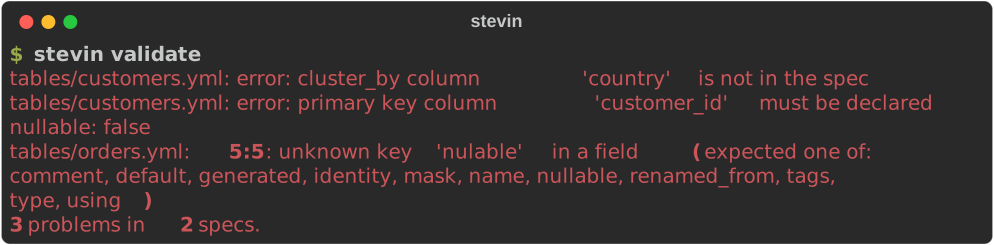
A spec with mistakes in it says where, down to the line and column, so a typo in a key is caught here rather than silently ignored:
3. Plan
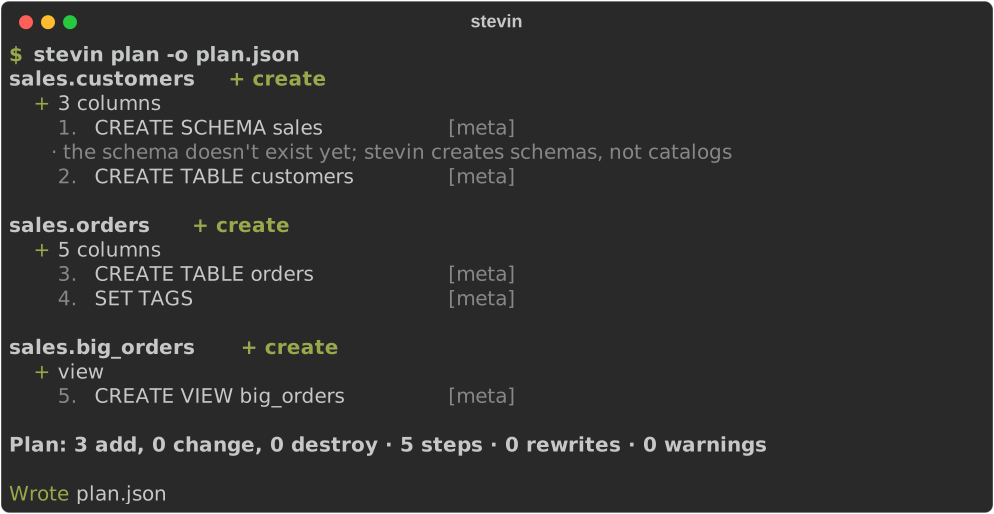
plan reads what's live, diffs it against your specs, and prints what it would do. On an
empty catalog that's everything. The schema is created first, then each table and the
view, and every step is numbered and labelled with its risk class.
| Risk | Means |
|---|---|
meta |
a metadata change — instant, no data touched |
feature |
turns on a Delta table feature a later step needs, as a step of its own, with what it costs |
rewrite |
rewrites data files — slow and costly on a big table; a restore point is recorded first |
destructive |
drops something; apply refuses it without --allow-destructive |
-o plan.json saves the plan. That file is what you review and what apply runs, so
what runs is exactly what was reviewed.
4. Apply
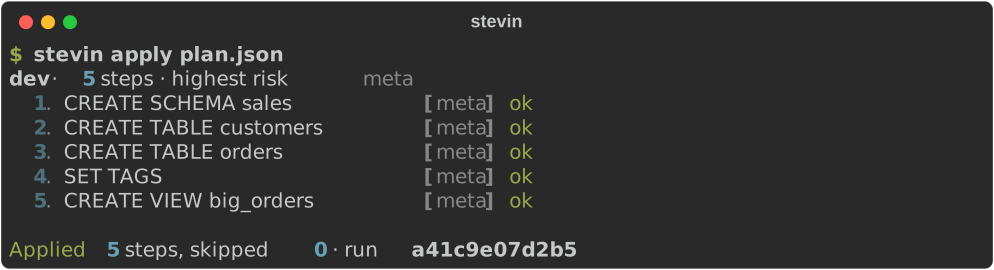
Every run is recorded in Delta tables in your history_schema. The run id names it. An
interrupted apply picks up where it stopped when you run it again.
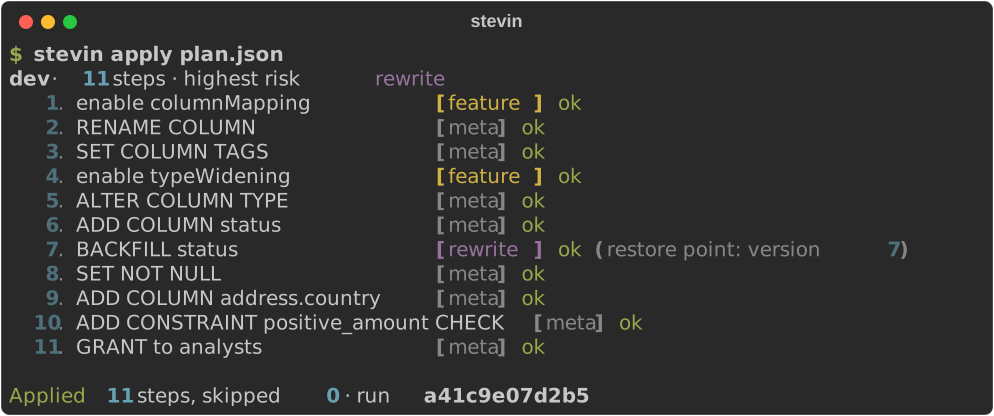
Working on your own, skip the file: stevin apply plans, shows the plan and asks
before it runs anything. Here, adding a column:
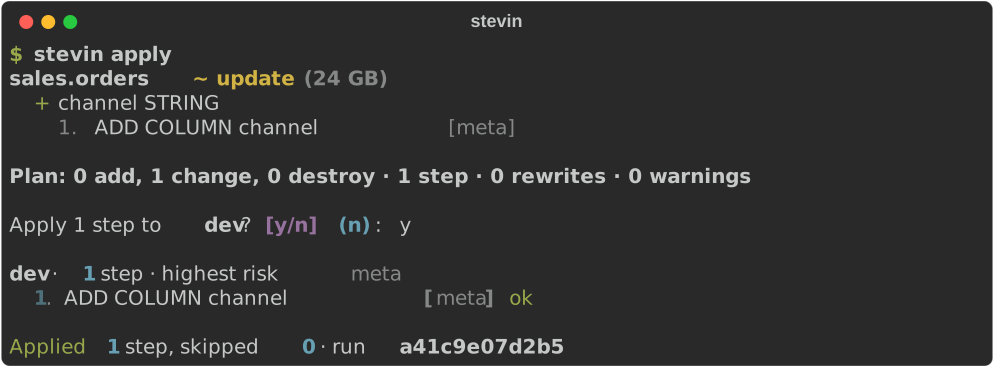
Plan again and there's nothing left to do. Unity Catalog is the state: there's no state file to keep in sync.

5. Change something
A few weeks later, orders needs to change. The customer column gets its proper name and
a tag, amount needs more digits, every order gets a status, addresses get a country,
amounts can't go negative, and analysts may read the table:
table: ${catalog}.sales.orders
comment: Order facts, one row per order
cluster_by: [order_date]
tags:
  domain: sales
grants:
  - principal: analysts
    privileges: [SELECT]
columns:
  - name: order_id
    type: bigint
    nullable: false
  - name: order_date
    type: date
    nullable: false
  - name: customer_ref
    type: string
    renamed_from: cust_id
    tags: {pii: "true"}
  - name: amount
    type: decimal(18,2)
  - name: status
    type: string
    nullable: false
    using: "'open'"
  - name: address
    type:
      struct:
        - {name: street, type: string}
        - {name: zip, type: string}
        - {name: country, type: string}
constraints:
  - primary_key: [order_id]
  - check: {name: positive_amount, expression: "amount >= 0"}
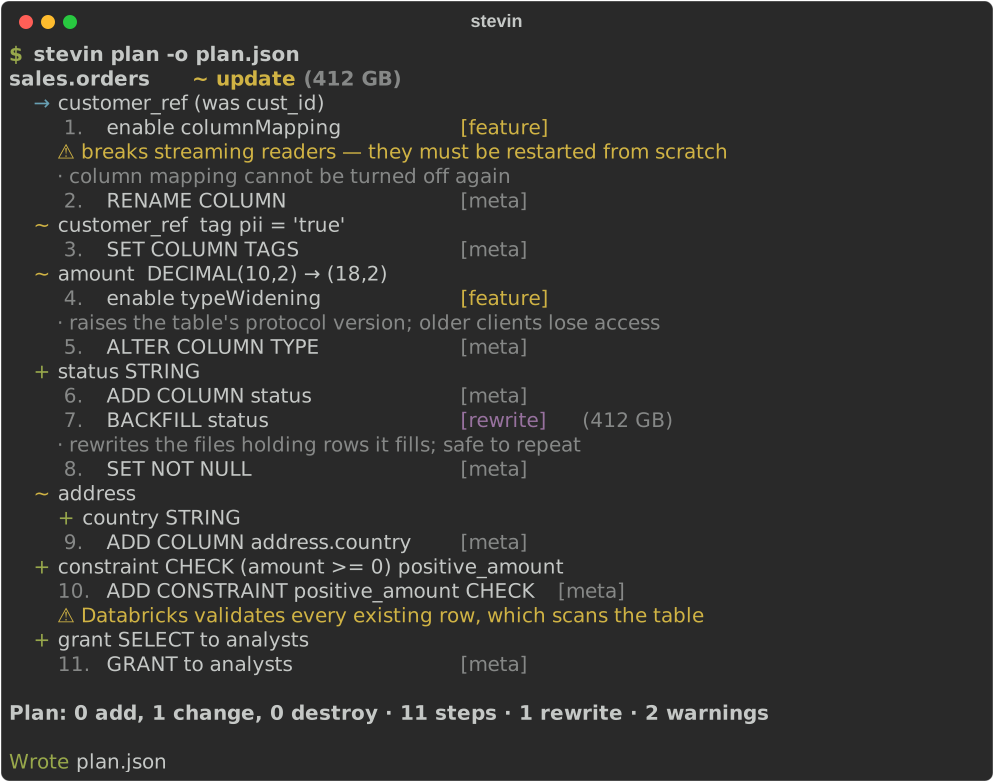
Read it top to bottom. It's everything apply will do, in order:
- A rename, not a drop and an add.
renamed_fromsays what happened, so the data stays. Renaming needs Delta's column mapping, so the plan turns that on first, as afeaturestep, and warns what it breaks. - Widening is metadata.
DECIMAL(10,2) → (18,2)needs type widening, turned on once, then it's instant. What Delta can't widen in place is planned as a rewrite (step 6). - A new NOT NULL column gets filled first.
using: "'open'"fills the existing rows, thenNOT NULLis set. The fill rewrites files, so it's arewritestep, with the table's size next to it. - Nested fields are first class.
address.countryis added inside the struct. - Warnings say what a step costs. A new CHECK scans every row, and the plan says so.
6. When the data has to move
Some changes can't be made in place. Here customer_ref becomes a bigint. Delta can't
cast a column's data in place, so stevin rebuilds the table: it stages the converted
rows, replaces the table from them (keeping its identity and history), puts back what a
query result can't carry, and drops the staging table. --clone takes a zero-copy backup
first.
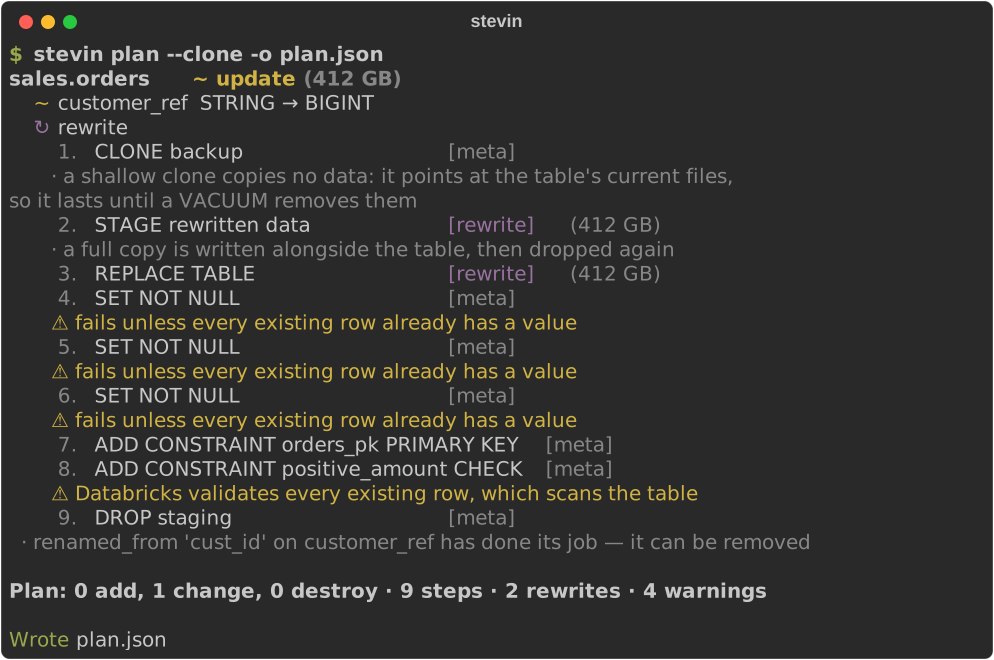
stevin writes the obvious conversions itself (a cast, a struct rebuilt field by field)
and asks for a using: expression where it shouldn't
guess. The safety model has the details.
7. When something would be destroyed
Take address out of the spec and the plan says, in red, that it drops a column:
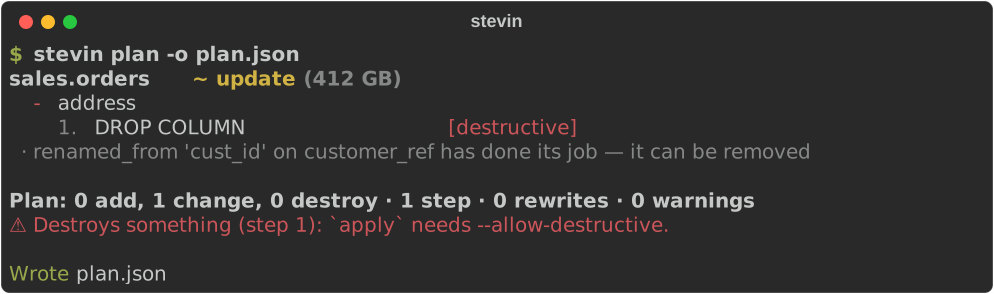
apply refuses a plan like that before running anything, until you say you mean it:

Only what stevin manages can ever be dropped. A table someone made by hand is reported as unmanaged and left alone. See ownership.
8. When someone changes things by hand
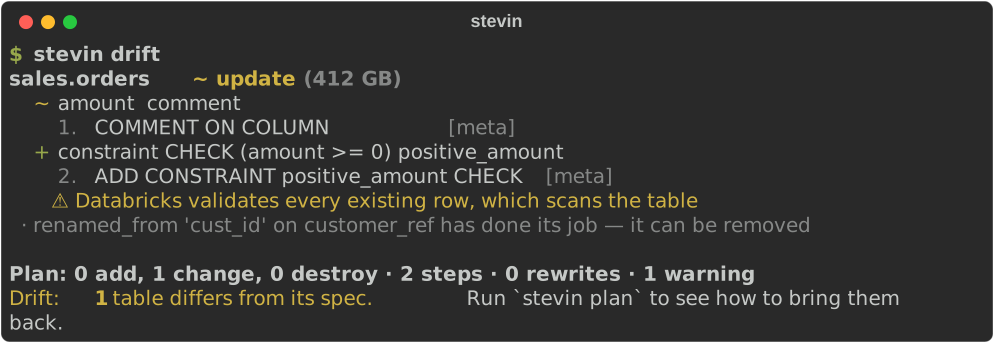
Someone edits a comment in Catalog Explorer and drops a constraint. drift compares live
tables with the specs and exits with 2 when they differ, so a scheduled job can
alert on it:
9. In a pull request
In CI, the GitHub Action plans every pull request and posts the plan as a
comment, updated on every push. This is the comment for the change in step 5, as
stevin plan -f md writes it:
On merge, a workflow runs stevin apply on the plan that was reviewed. In CI
has both workflows, ready to copy.
Where next
- Feature gallery: every kind of change, each with its spec and plan.
- Writing a spec: the full reference.
- Commands: every command and flag.
- Safety model: what stevin will and won't do to your tables.
- In CI: the GitHub Action.
🟠 stevin plan ·
dev¶Plan: 0 add, 1 change, 0 destroy · 11 steps · 1 rewrite · 2 warnings
Warning
Rewrites the data of
sales.orders(412 GB). A restore point is recorded first.sales.orders · ~ update · 3 additions, 1 removal, 4 changes — rebuilt, 412 GB
customer_refstringstring tags pii=trueamountdecimal(10,2)decimal(18,2)statusstring NOT NULLaddressstruct<street:string,zip:string>struct<street:string,zip:string,country:string>address.countrystringcust_idstringconstraintsprimary key (order_id)primary key (order_id), check positive_amountgrantsanalysts: SELECT8 rows unchanged
column mapping cannot be turned off again
undo:
RESTORE TABLE `dev`.`sales`.`orders` TO VERSION AS OF 1SQL
stevin 0.1.0 · specs
4459fb6631ea3805· live state3eb999d480608054