Feature gallery
One change at a time: the spec as you'd write it, and the plan stevin makes from it against a table that already exists. As in the tour, every terminal is real output. For the full rules, follow the link at the end of each section to Writing a spec.
Columns
Add a column, add a field inside a struct, give a column a comment. All of these are metadata: nothing is rewritten.
table: ${catalog}.sales.orders
columns:
  - {name: order_id, type: bigint, nullable: false}
  - {name: amount, type: "decimal(10,2)", comment: "Gross, incl. VAT"}
  - {name: status, type: string}
  - name: address
    type:
      struct:
        - {name: street, type: string}
        - {name: zip, type: string, comment: Postal code}
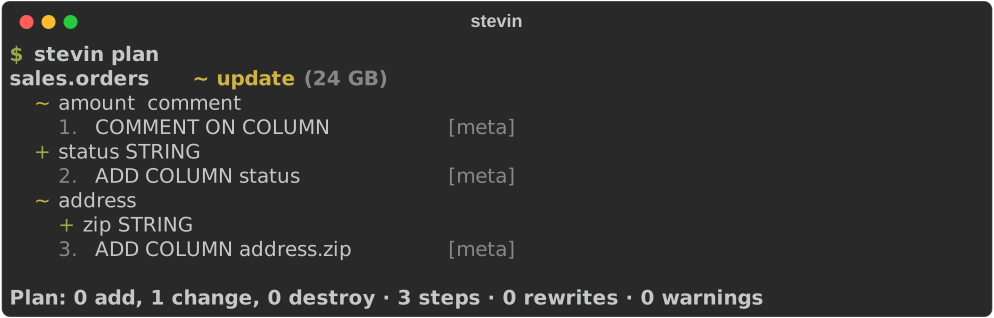
A field inside a struct, an array or a map is addressed by its path (address.zip,
lines.element.qty) and diffed like a column. Types →
Renames
Columns and tables are matched by name, so a rename would otherwise look like a drop and
an add: data loss. renamed_from says what happened.
table: ${catalog}.sales.orders
renamed_from: order_facts
columns:
  - {name: order_id, type: bigint, nullable: false}
  - {name: customer_ref, type: string, renamed_from: cust_id}
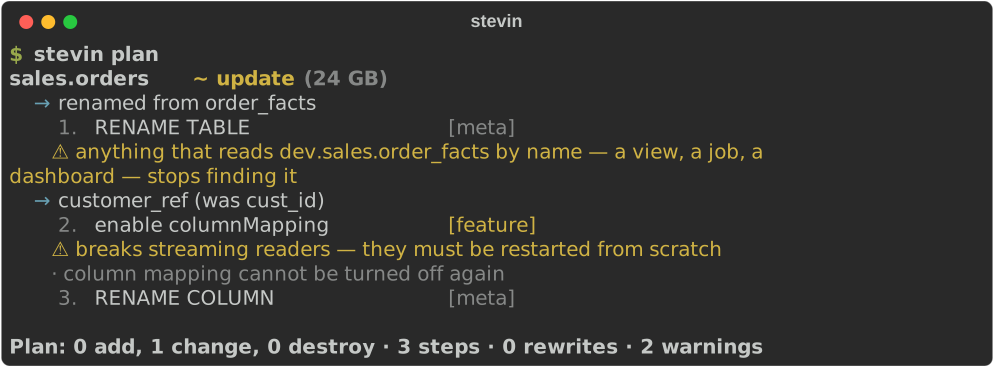
Renaming a column needs Delta's column mapping, which the plan turns on first. Once
the rename has been applied everywhere, renamed_from has done its job and the plan
says it can go. Renames →
Widening types
A wider type is a metadata change once type widening is on. This works at the top level and anywhere inside a struct, array or map.
table: ${catalog}.sales.orders
columns:
  - {name: quantity, type: bigint}
  - {name: amount, type: "decimal(18,2)"}
  - {name: lines, type: "array<struct<sku:string,qty:bigint>>"}
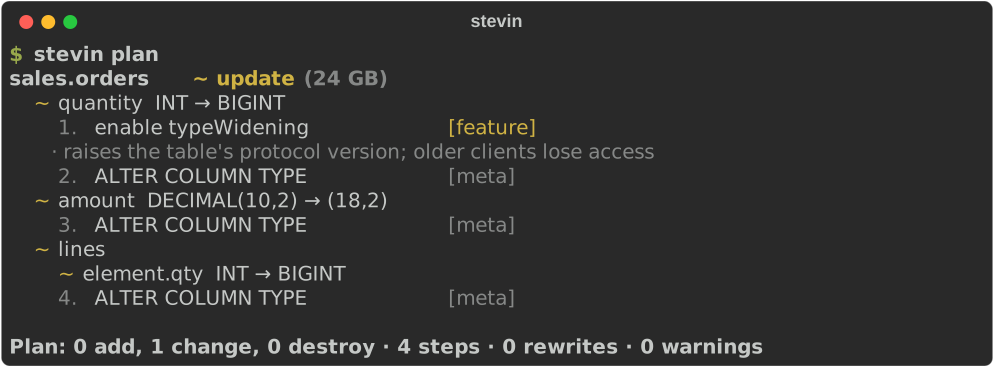
Which widenings Delta allows was checked against a live workspace. The list →
Rewrites
A type change that isn't a widening means the data has to move. stevin stages the
converted rows, checks them against the original, replaces the table from them (keeping
its identity and history), puts back what a query result can't carry, and drops the
staging copy. using: says how to convert where a plain cast isn't right.
table: ${catalog}.sales.orders
columns:
  - {name: order_id, type: bigint, nullable: false}
  - name: placed
    type: date
    using: "to_date(placed, 'yyyy-MM-dd')"
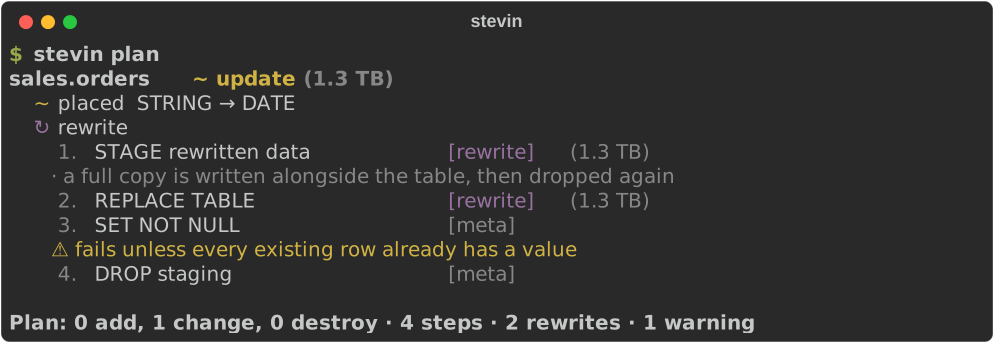
The table's size is on every step that rewrites it, and a restore point is recorded first. What a rewrite does →
NOT NULL
A new column arrives empty in every existing row, so using: fills them before
NOT NULL is set. A field inside a struct can be made NOT NULL in place too.
table: ${catalog}.sales.orders
columns:
  - {name: order_id, type: bigint, nullable: false}
  - name: region
    type: string
    nullable: false
    using: "'unknown'"
  - name: address
    type:
      struct:
        - {name: street, type: string}
        - {name: zip, type: string, nullable: false}
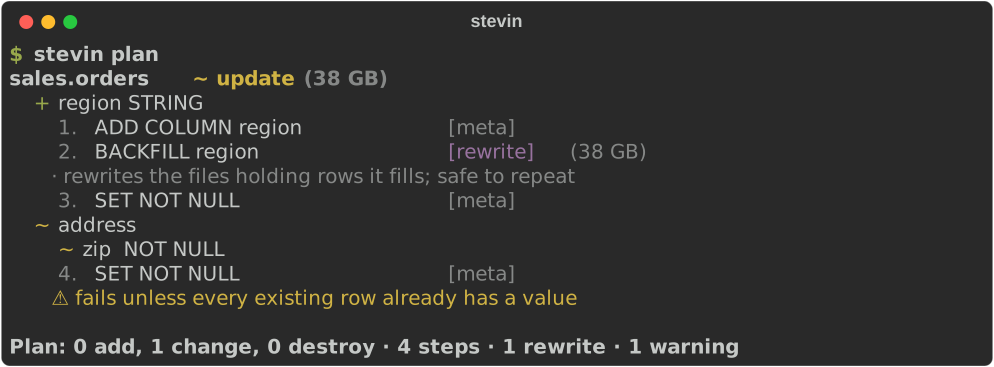
Before each SET NOT NULL, stevin checks for NULLs, so a column that isn't ready is
refused with a clear reason, not a half-applied plan.
NOT NULL columns →
Partitioning to liquid clustering
The migration most older Databricks tables need: take partitioned_by out, put
cluster_by in. Delta can't cluster a partitioned table in place, so the plan rewrites
it, rows and all, and shows what that costs. Nothing is converted here, so it is a
single statement: the data is written once.
table: ${catalog}.sales.events
cluster_by: [event_date, customer_id]
columns:
  - {name: event_id, type: bigint}
  - {name: event_date, type: date}
  - {name: customer_id, type: bigint}
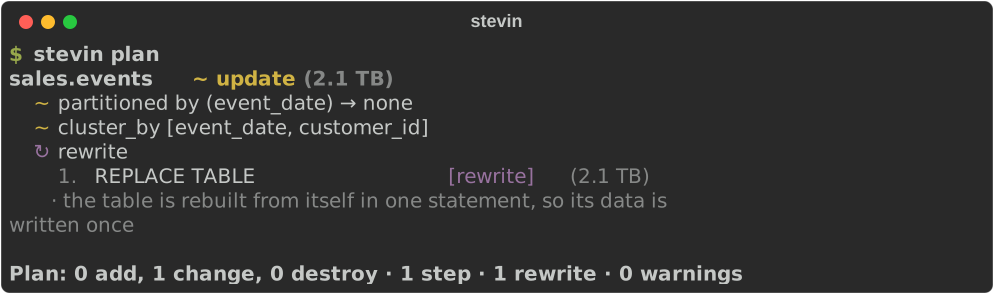
A spec that leaves partitioned_by out keeps the table's partitions, so nothing is
rewritten by surprise. Partitioning →
Seeds
The other half of the setup notebook: the table, and the handful of rows that belong in it. A CSV beside the spec, or a few rows written out in it — either way the file is the truth, and applying it replaces what the table holds.
table: ${catalog}.reference.countries
columns:
  - {name: code, type: string, nullable: false}
  - {name: name, type: string}
seed: countries.csv
The plan compares a hash the loaded table carries, so it costs nothing to ask and says seed 2 rows from countries.csv instead of printing them. Seeds →
Constraints
Primary keys, foreign keys and CHECKs. Keys are informational in Unity Catalog; a CHECK is enforced, so adding one validates every row, and the plan says so.
table: ${catalog}.sales.orders
columns:
  - {name: order_id, type: bigint, nullable: false}
  - {name: customer_id, type: bigint}
  - {name: amount, type: "decimal(18,2)"}
constraints:
  - primary_key: [order_id]
  - check: {name: positive_amount, expression: "amount > 0"}
  - foreign_key:
      columns: [customer_id]
      references: ${catalog}.sales.customers
      referenced_columns: [customer_id]
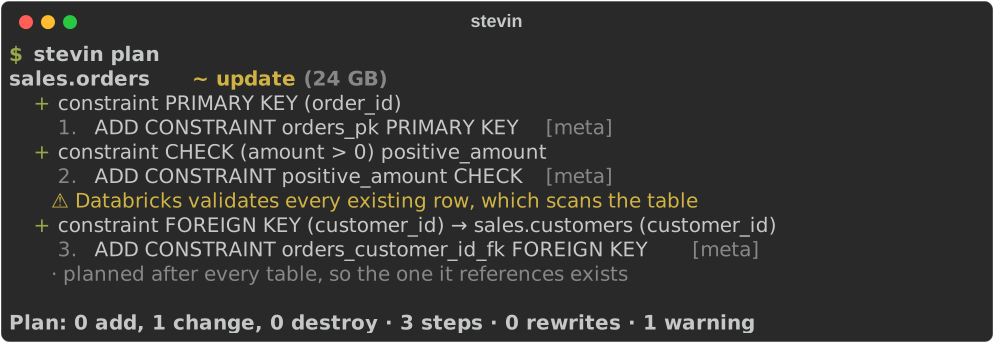
Foreign keys are planned after every table, so the table they reference always exists first. Constraints →
Clustering
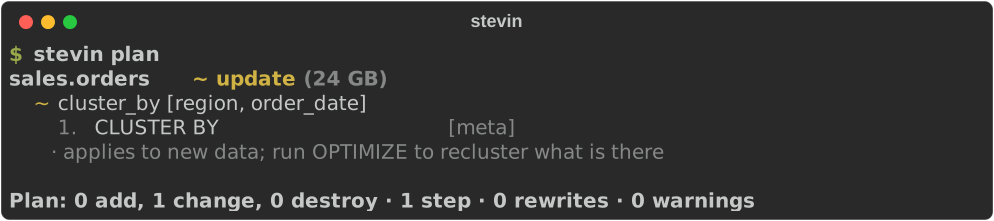
Liquid clustering keys, or auto to let Databricks choose them.
table: ${catalog}.sales.orders
cluster_by: [region, order_date]
columns:
  - {name: order_id, type: bigint}
  - {name: order_date, type: date}
  - {name: region, type: string}
Tags, grants and owners
Table tags, column tags, grants per principal, and the owner. A principal the spec names gets
exactly those privileges. One it doesn't name is someone else's business: it's
reported, never touched. The same goes for a tag the spec doesn't mention, so removing
one takes a null. A new owner is always the last step: after it, stevin may not be
allowed to change the table.
table: ${catalog}.sales.customers
owner: crm-team
tags: {domain: crm, legacy: null}
grants:
  - {principal: analysts, privileges: [SELECT]}
  - {principal: etl, privileges: [SELECT, MODIFY]}
columns:
  - {name: customer_id, type: bigint}
  - {name: email, type: string, tags: {pii: email}}
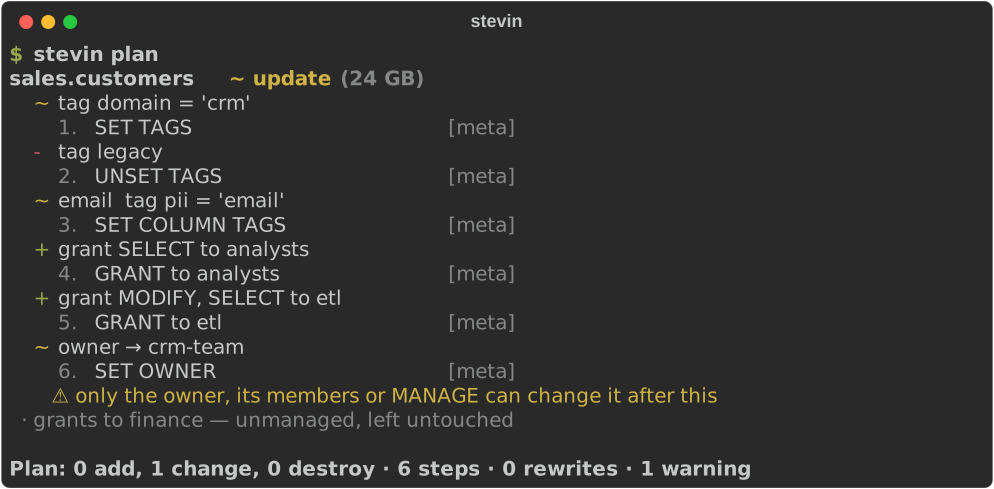
Column tags → · Removing a tag → · Grants → · Owners →
Reading a big plan
Thirty tables is where a terminal stops helping. stevin ui serves the plan as one
page on localhost: every object as a comparison — what it is now, what it becomes — with
the statements underneath, and two readings of the same rows. Changes only for whoever
approves it, full object for whoever wrote the spec. stevin plan -f html -o
plan.html writes that page as a single file you can attach to a pull request.
It is the same plan object the terminal and the pull-request comment render, so the
three can't disagree. And it is read-only: no apply button, nothing fetched, nothing
written. ui →
Handing something to another tool
Plenty of teams already have something that owns part of a table: a policy framework
that sets grants, a catalogue that writes the tags an ABAC rule reads, a data contract
that owns every description. Two tools writing
the same thing is how a Monday starts with a table nobody recognises — so manage: draws
the line, and stevin stays on its side of it.
version: 1
specs: [tables]
history_schema: ${catalog}.stevin

targets:
  dev:
    vars:
      catalog: dev

manage:
  grants: false
  tags: false
A key that isn't stevin's is refused where you write it, not ignored later:

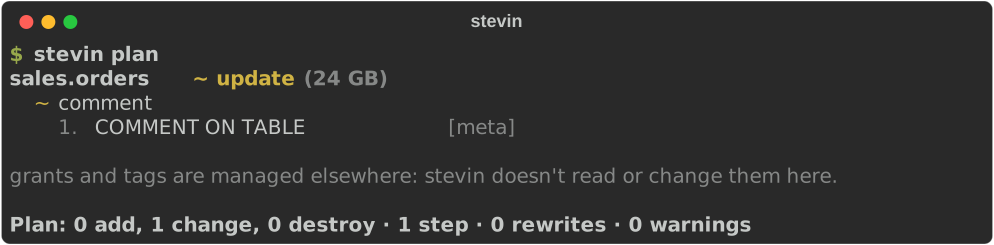
And the plan says what it could not have touched, so a reviewer doesn't have to guess:
Masks and row filters
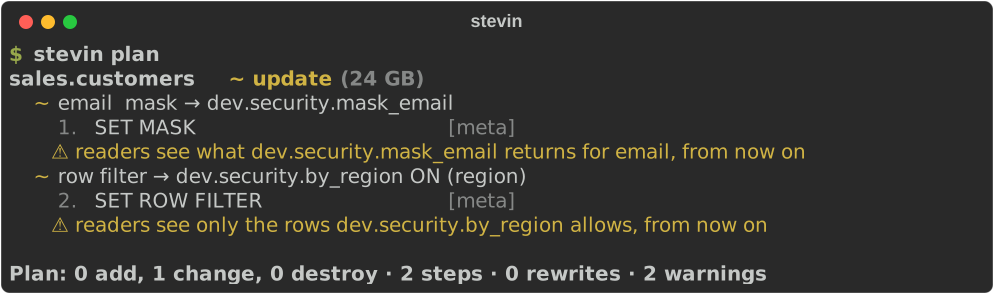
A column mask or row filter points at a SQL function, which can be a function spec in the same project. stevin treats them as security controls. It adds and replaces them and never removes one. A new table is created with them, so it never exists unprotected, even for a moment.
table: ${catalog}.sales.customers
columns:
  - {name: customer_id, type: bigint}
  - {name: email, type: string, mask: "${catalog}.security.mask_email"}
  - {name: region, type: string}
row_filter:
  function: ${catalog}.security.by_region
  columns: [region]
Views
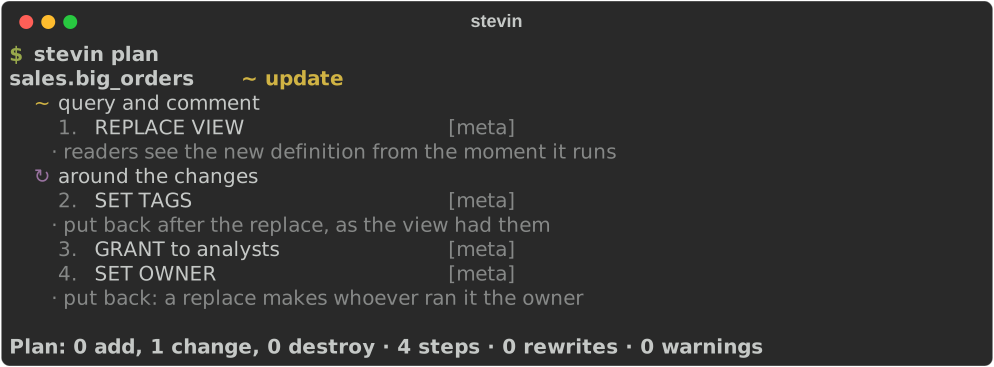
A view's shape is its query. A changed query replaces the view, and its tags and grants, which a replace drops, are put back straight after.
view: ${catalog}.sales.big_orders
comment: Orders over 5000
tags: {domain: sales}
grants:
  - {principal: analysts, privileges: [SELECT]}
query: SELECT order_id, amount FROM ${catalog}.sales.orders WHERE amount > 5000
Functions
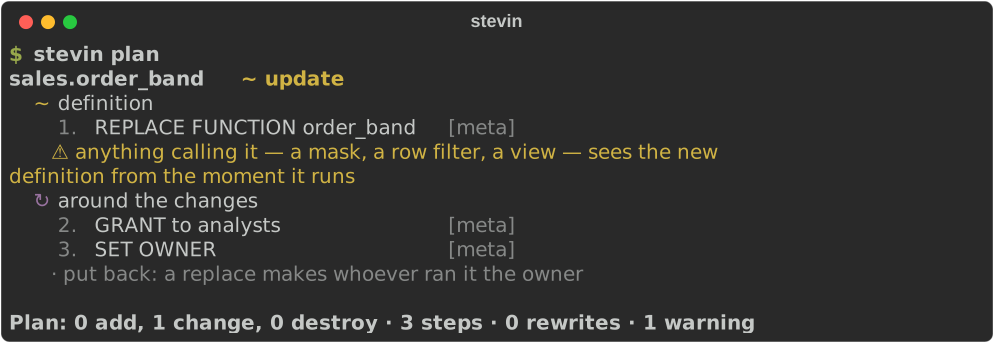
SQL functions: parameters, return type and body. A changed body replaces the function, and puts its grants back. The plan warns that everything calling it sees the new definition at once.
function: ${catalog}.sales.order_band
comment: Small, medium or large, by amount
parameters:
  - {name: amount, type: "decimal(18,2)"}
returns: string
grants:
  - {principal: analysts, privileges: [EXECUTE]}
body: |
  CASE WHEN amount < 100 THEN 'small'
       WHEN amount < 2500 THEN 'medium'
       ELSE 'large' END
Schemas and volumes
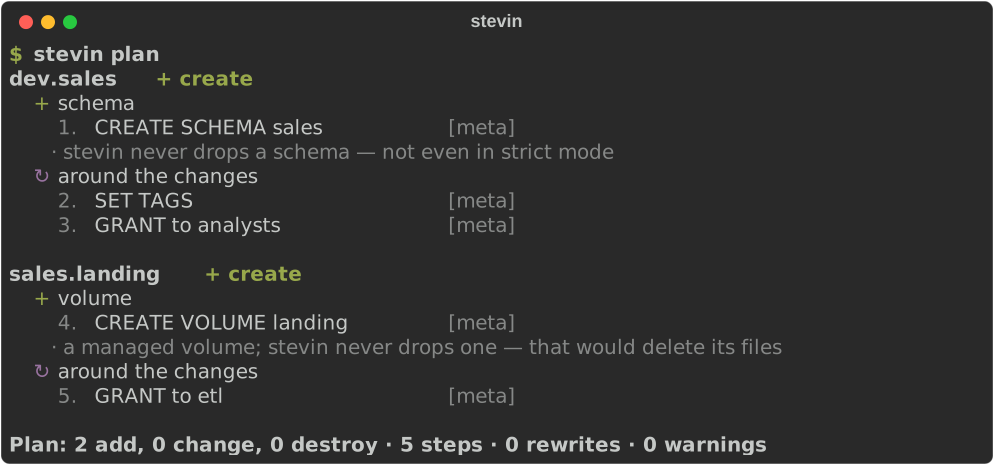
A schema's comment, tags and grants, and managed volumes: places for files. Neither is ever dropped.
Identity, generated and default columns
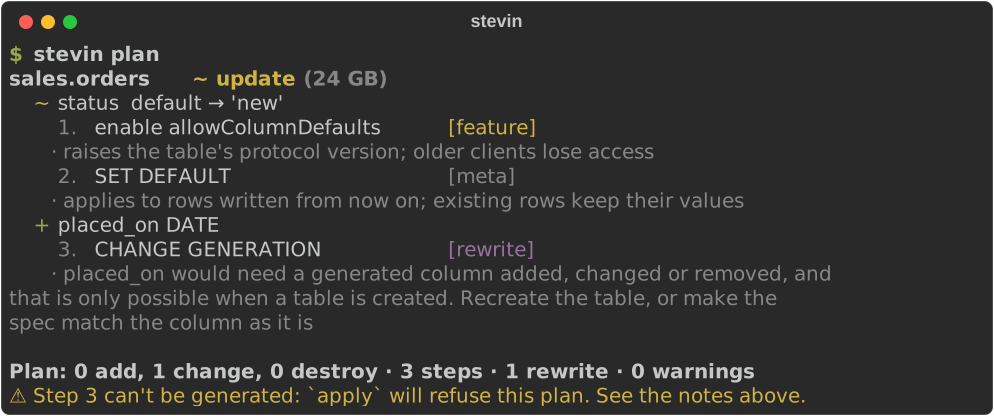
A default can be set at any time; it needs a table feature the first time. An identity or generated column only exists from table creation, so adding one to an existing table is refused, with the reason, rather than planned as something that would fail.
table: ${catalog}.sales.orders
columns:
  - {name: order_id, type: bigint, identity: always}
  - {name: placed_at, type: timestamp}
  - {name: status, type: string, default: "'new'"}
  - {name: placed_on, type: date, generated: CAST(placed_at AS DATE)}
Identity, generated and default columns →
Hooks
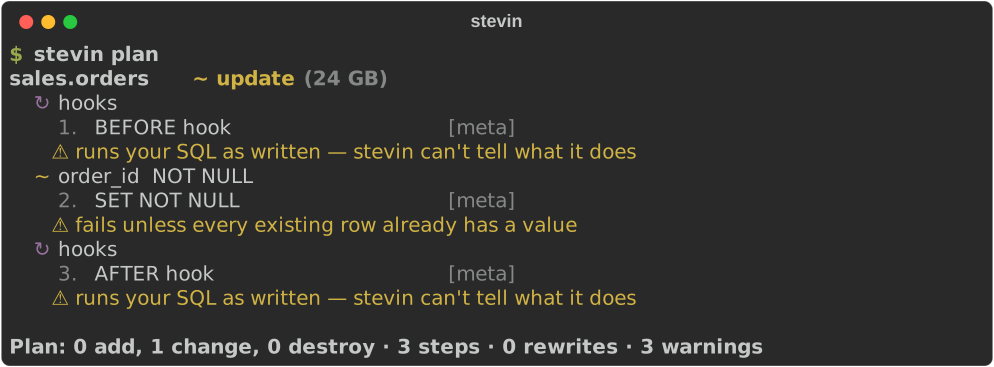
SQL to run before and after a table's changes, for what a spec can't say. Hooks run only when the table changes.
table: ${catalog}.sales.orders
hooks:
  before: DELETE FROM ${catalog}.sales.orders WHERE order_id IS NULL
  after: OPTIMIZE ${catalog}.sales.orders
columns:
  - {name: order_id, type: bigint, nullable: false}
Ownership
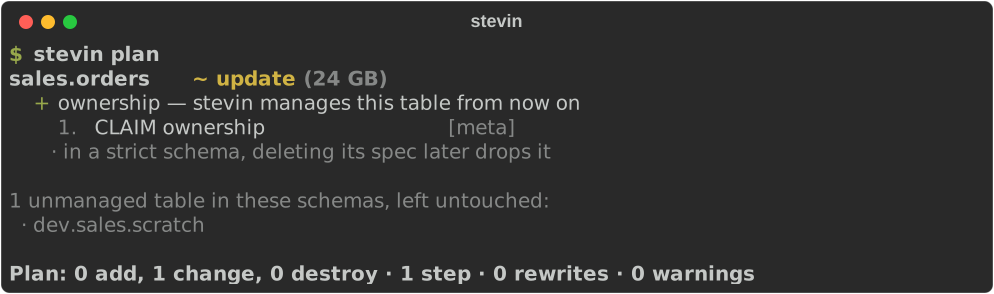
stevin only ever drops what it manages. A table it created carries a marker. A table someone else made is claimed the first time a spec describes it, as a visible step of its own. Anything no spec describes is listed as unmanaged and left alone.
table: ${catalog}.sales.orders
columns:
  - {name: order_id, type: bigint}
  - {name: amount, type: "decimal(18,2)"}
Adopting drift
Someone added a column by hand at 2am to unblock a load. stevin drift says so —
and stevin adopt writes it into the spec that already describes the table, so the
change becomes a reviewable git diff instead of something to retype or to undo.

# Orders, from the ingest pipeline
table: ${catalog}.sales.orders
comment: Order facts

columns:
  - {name: order_id, type: bigint}
  - {name: amount, type: "decimal(18,2)"}
  - {name: region, type: string, comment: ISO 3166 code}
The file is edited, not rewritten: the comment at the top, the ${catalog}, the
blank line and the flow style are all still there. What comes from the workspace is
what stevin would otherwise have planned; a tag or grant the spec never mentioned
stays unmanaged, and a seed's rows stay the file's own.
Strict schemas
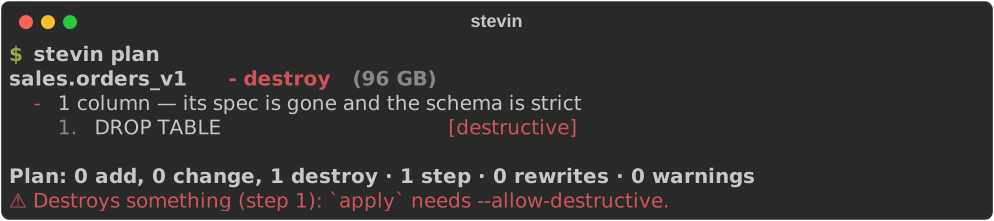
In an additive schema (the default) a managed table whose spec is deleted stays. In a
strict schema it's dropped, as a destructive step apply won't run without
--allow-destructive.
version: 1
specs: [tables]
history_schema: ${catalog}.stevin

targets:
  dev:
    vars:
      catalog: dev

schemas:
  ${catalog}.sales: strict
Import
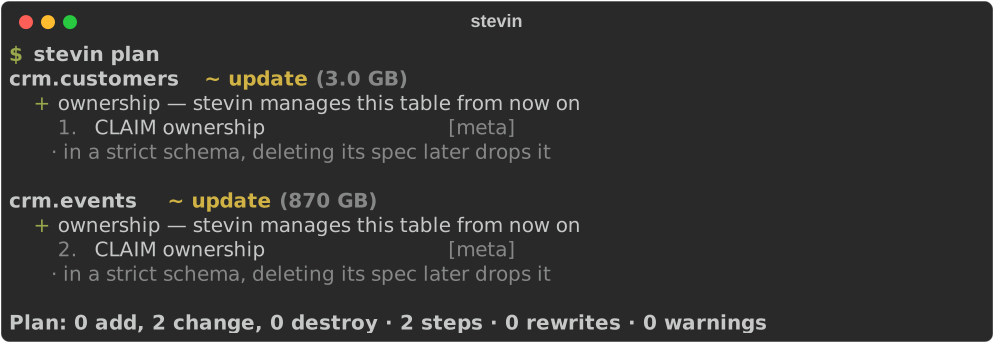
Most schemas exist before stevin does. import writes a spec for everything in one,
tables, views, functions and volumes, so the first plan has nothing to do but claim
them.

# yaml-language-server: $schema=https://kostavo-oss.github.io/stevin/schema/spec.json
table: ${catalog}.crm.customers
comment: One row per customer
tags:
  domain: crm
columns:
- name: customer_id
  type: bigint
  nullable: false
- name: email
  type: string
  comment: Primary contact
- name: address
  type: struct<street:string,zip:string>
grants:
- principal: analysts
  privileges:
  - SELECT
import -f sql writes CREATE statements instead. Commands →
SQL specs, and what they can't say
A SQL spec supports exactly what sqlglot can parse. What it can't parse, such as a column mask, is an error that points you to YAML, never a silent gap.
CREATE TABLE ${catalog}.crm.customers (
  customer_id BIGINT NOT NULL,
  email STRING MASK ${catalog}.security.mask_email
);
