With an Asset Bundle
Most Databricks projects already have a
bundle: databricks.yml, with
the targets, the workspaces, the variables, and often the schema the tables live in.
stevin takes all of that from it, so none of it is written twice.
It doesn't interpret your bundle to do that. It asks the Databricks CLI — the same
databricks bundle validate a deploy runs — and uses the answer: variables filled in,
lookup: variables resolved against the workspace, and every object under the name a
deploy would really give it.
The division is simple: the bundle owns the containers, stevin owns the tables in them.
Point at it
That's the whole connection. From the bundle stevin takes:
| From the bundle | What stevin does with it |
|---|---|
targets and the default: true one |
its own targets; -t picks one, and without -t the bundle's default |
workspace.profile / workspace.host |
how to reach the workspace |
variables, resolved |
${catalog} and friends in your specs — including a lookup: the CLI ran |
a warehouse_id variable |
the SQL warehouse to plan and apply on |
resources.catalogs, .schemas, .volumes |
names your specs can use — and objects stevin leaves alone |
Everything in that table comes from one databricks bundle validate -o json -t <target>,
run once per command, so what stevin sees is what a deploy would do — mutators,
presets and all. Files listed under include: are part of that, which is where most
bundles keep their resources.
Name things once
A bundle that declares the schema:
bundle:
  name: shop

variables:
  catalog:
    default: dev

resources:
  schemas:
    sales:
      catalog_name: ${var.catalog}
      name: sales
      comment: Sales data

targets:
  dev:
    default: true
  prod:
    variables:
      catalog: prod
A spec can point straight at it, in the bundle's own spelling:
table: ${resources.schemas.sales.catalog_name}.${resources.schemas.sales.name}.orders
comment: Order facts
columns:
  - {name: order_id, type: bigint, nullable: false}
  - {name: amount, type: "decimal(18,2)"}
Variables work either way — ${catalog} or the bundle's ${var.catalog} — so an
existing spec needs no rewriting.
What stevin won't touch
A catalog, schema or volume the bundle declares is the bundle's:
- It is never created or managed by stevin. Two tools creating the same schema is
how a later
databricks bundle deploymeets an object it didn't make. - A stevin spec for one is an error, naming the bundle's resource.
planis where you find out — before anything is applied. importwrites no spec for it.- A table whose schema isn't deployed yet stops the plan and says what to run:

So the order of a first run is: databricks bundle deploy, then stevin apply.
Development mode, and other renaming
A target in mode: development, or one with presets.name_prefix, does not deploy the
names that are in the file — the CLI rewrites them first:
| target | the schema sales deploys as |
|---|---|
mode: development |
dev_jane_sales |
presets: {name_prefix: team_} |
teamsales — the underscore dropped |
| neither | sales |
stevin reimplements none of that, which is the reason it asks rather than reads. The
same call settles the other things a file can't: a lookup: variable becomes the id it
looked up, and ${workspace.current_user.short_name} becomes a user.
When the CLI can't answer
There are two of those, and they mean different things.
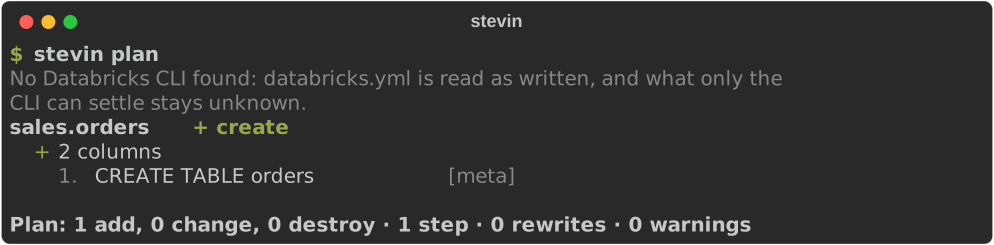
No CLI on your PATH is a machine that was never going to answer — a laptop, a CI
job that only lints. stevin reads the bundle file itself, says that it did, and resolves
what a file can:
variable defaults, target overrides, BUNDLE_VAR_<name> from the environment, and
${var.…}, ${bundle.name} and ${bundle.target} references. What it won't do is guess
the rest: a lookup, a complex variable, a current user, and every name a renaming target
deploys under stay unknown, with the reason attached, so a spec that uses one fails
saying why instead of planning against the wrong schema.
A CLI that is there and fails is a bundle that doesn't resolve, and stevin stops:
the bundle shop doesn't resolve for target 'dev': the Databricks CLI could not
resolve the bundle: Error: two profiles match this host
Its words, not stevin's. Carrying on from the file would mean planning against names a deploy would never use — and being told to install something you already have helps nobody. The Databricks CLI needs to be logged in for this: it resolves nothing at all without credentials.
validate never asks. It promises no workspace and no network, and the CLI is both,
so stevin validate reads the bundle file on every machine, with or without a CLI. A
spec that uses a name only the CLI could settle — what a mode: development target
deploys a schema under — is linted with a name standing in for it, and validate says
which names it left unsettled. That is nothing wrong with the spec: plan asks.
stevin.yml has the last word
A bundle has no word for some things, so stevin.yml adds them:
specs: [tables]
bundle: databricks.yml

targets:
  prod:
    mode: strict            # stevin's own: additive or strict
    warehouse_id: abc123def456
    vars:
      catalog: prod         # overrides the bundle's variable
A target named here that the bundle doesn't have is an error — it's almost certainly a
typo. And a bundle's own mode: development | production is about jobs and pipelines: it
has nothing to do with stevin's additive or strict,
and is ignored.
What still can't be settled
A variable whose value isn't a name — a whole cluster definition, say — can't become
part of one. stevin says so rather than rendering something odd into a table name:
give that target a vars entry with the string you meant.
In CI
The GitHub Action takes the same target name, and wants the CLI in the job — which a bundle workflow installs anyway:
- uses: databricks/setup-cli@v1.17.0
- uses: kostavo-oss/stevin@v0
  with:
    target: prod          # the bundle's target
Deploy the bundle first and apply after, so the schemas exist before the tables that go in them: