Commands
stevin validate            # spec lint, no connection needed
stevin import <schema>     # live tables -> YAML specs
stevin plan -t <target> [-o plan.json] [--select <name>] [--format rich|md|json|html]
stevin apply [-t <target>] [--select <name>] [--yes]   # plan, show, ask, run
stevin apply plan.json     # run a saved plan, as CI does
stevin show plan.json [--format rich|md|json|html]
stevin ui [plan.json]      # the plan as a page in a browser
stevin drift -t <target>   # exit code 2 on drift, for CI
stevin list -t <target> [--json]   # what the specs describe, and whether each exists
stevin access <catalog.schema.table>   # who may see a table, and through what
stevin adopt [<name>...]   # drift, written back into the specs
stevin doctor              # check the setup; changes nothing
stevin verify --schema <catalog.schema>   # run the Databricks assumptions
stevin force-unlock
stevin schema [spec|project]   # the JSON Schema editors use
stevin version
Every command that works on a project takes --config to point at a stevin.yml, and
-t/--target to pick the target whose variables are substituted — without it, the only
target or the one marked default: true (in stevin.yml or the
bundle). That is all of them but show, schema and
version, which take neither. Every command that talks to a workspace — all but those
three and validate — also takes --warehouse-id, which otherwise comes from the
target or $DATABRICKS_WAREHOUSE_ID, and --profile.
validate
Lints specs offline: unknown keys, type strings, duplicate columns and nested fields,
cluster_by and primary-key columns that don't exist, nullable primary-key columns,
contradictory renamed_from hints, and type names that look misspelled. And what is
wrong between specs: two files that describe the same name — whatever its case, once
the variables are filled in — and objects that read each other in a cycle. No
credentials, no network — ideal for a pre-commit hook or the fast lane of CI. Exits
non-zero if anything is wrong.
schema
Prints the JSON Schema an editor uses for completion and inline errors, for the version you have installed. See editor support.
import
stevin import main.sales -o tables -t dev             # YAML specs
stevin import main.sales -o tables -t dev -f sql      # SQL specs
Generates specs from the tables and views that already exist, and the SQL functions
their masks and row filters name, so adoption
doesn't start with a blank file. If the target has a variable whose value is that
catalog, the generated spec uses ${catalog} instead of the literal name — foreign keys
into the same catalog too — so it fits every target. Non-Delta tables are reported and
skipped, and so are the platform's defaults and Unity Catalog's own bookkeeping
properties. An imported table is claimed as managed on its first apply.
-f sql writes CREATE statements. A table with column tags, masks or a row filter —
what SQL specs can't say — is written as YAML
instead, and the output says so.
adopt
stevin drift                      # main.sales.orders has a column no spec mentions
stevin adopt main.sales.orders    # write it into the spec
git diff                             # and now it is a reviewable change
tables/orders.yml
  + columns: region string
Adopted 1 spec. `stevin plan` is quiet now: read the diff, and commit it.
The other direction from apply. drift can only tell you a table was changed by
hand; the change is usually wanted, and the only ways out were to retype it into the
spec or to apply the plan and undo someone's work. This is the third: the spec file is
edited to match the workspace, and what you are left with is a git diff.
No table is touched — this writes spec files and nothing else.
What it takes from the workspace is what stevin would otherwise have planned: a
column, a type, a nested field, not null, a comment, clustering, a view's query, a
function's body. What it leaves alone is everything a spec never claimed — a tag,
property or grant the file doesn't mention stays unmanaged, because adopting drift is
not the moment to start managing something new. A tag the spec does declare takes the
live value.
And what only a file can say survives, because the file is edited rather than
rewritten: ${catalog} and every other variable, renamed_from, using:, a seed's
rows — and the comments and blank lines around them.
- Names work like
--select:orders,sales.orders,sales.*. With none, every spec that has drifted. --dry-runprints what would change and writes nothing;--diffprints the new text.- A
.sqlspec is refused with the reason: rewriting aCREATEstatement from live state is not something to do by text search. - After writing, stevin reads the file back and diffs it against the workspace. What it couldn't express is printed as Still planned — a seed is the usual one, because its rows live in the repo and no workspace can tell a file what they should be.
doctor
✓ project    stevin.yml, 14 specs in tables
✓ target     prod (catalog prod)
✓ bundle     databricks.yml — resolved via /opt/homebrew/bin/databricks
✓ workspace  https://dbc-1234abcd.cloud.databricks.com as you@example.com
⚠ warehouse  Serverless Starter (STOPPED)
             → It starts on the first statement. If it stays stopped, the workspace
               can't give it compute — that is not something stevin can fix.
✗ metastore  table quota 523 of 500
             → A dropped table counts for as long as UNDROP could bring it back, so
               this is often far above what the catalogs hold. …
✓ policies   SHOW EFFECTIVE POLICIES accepted on prod.sales (2 in scope)
Checks the project, the target, the bundle, the workspace, the warehouse, the metastore's
table quota, where apply would record a run, and whether the warehouse lists the
ABAC policies in scope of your schemas. Every line says what was looked at and
what was found; anything that isn't right says what to do about it.
The policies line asks SHOW EFFECTIVE POLICIES ON SCHEMA of each schema your specs
live in that is already there. A workspace that refuses gets a ⚠, never a ✗ — a plan
goes on without policies and says so — with the workspace's own reason and what
the manual says listing them takes: Databricks SQL or Runtime 16.4 and above,
and READ METADATA or MANAGE on the securable, or owning it. A plan asks per table,
which a principal may be allowed where the schema isn't. With manage: {policies:
false} there is no such line: nothing is asked.
It changes nothing — no schema is created, no warehouse started, no grant touched —
and exits 0 unless something will stop a run. --json gives a host the same findings.
Run it when a command fails in a way that seems to be about the environment rather than about your specs. Most of these checks exist because something once surfaced five steps into an apply instead of here.
verify
stevin verify --schema main.scratch      # makes it, uses it, drops it
stevin verify --schema main              # stevin names the schema
Databricks behaviour stevin relies on, in https://dbc-1234.cloud.databricks.com
(main.scratch):
  ✓ a table can read itself in a REPLACE … AS SELECT
  ✓ a replace keeps a table's tags, column tags and grants
  ✓ RESTORE puts back the table a replace changed
  ✓ a nested field's NOT NULL is an ordinary ALTER
  ✓ the widenings stevin calls metadata are allowed
  ✓ a seed's INSERT OVERWRITE with a column list is accepted
  ✗ CLUSTER BY AUTO is accepted and reads back
      the table doesn't read back as CLUSTER BY AUTO
      → `cluster_auto: true` needs predictive optimization on the workspace.
      Without it, that spec can't be applied here — use explicit keys.
  18 held, 1 didn't.
Every plan stevin makes rests on Databricks behaviour: that a REPLACE keeps a
table's tags and grants, that a nested NOT NULL is an ordinary ALTER, that the
warehouse runs in ANSI mode. Those were settled against one workspace on one runtime.
This runs them against yours, and where one doesn't hold it says what that costs —
in the workspace's own words, so you can search for them.
It is the only command besides apply and force-unlock that writes: it creates a
schema, makes tables, views and functions in it, and drops the schema with everything
inside when it is done. It will not use a schema that already exists — it drops what it
made, and that has to be nothing of yours. Nothing outside that schema is read or
touched.
A plain verify makes 14 tables, and 17 with --slow and --create-policy: probes
that only read a table share one. Unity Catalog counts a table against the metastore's
table quota
when it is created and takes it off some time after it is dropped, so on a metastore
near its limit, run it once rather than in a loop.
It creates no ABAC policy unless you ask. Two probes can only learn how a policy
reads back here by creating one — a row filter policy on a scratch table of their own,
dropped again — and stevin's promise is that it never writes a policy, so
a plain verify leaves them out and says so in a line of its own: 2 not run: reading
a policy back means creating one on a scratch table, which stevin does only when asked
(--create-policy). The probe that only reads, a table under no policy lists none,
without an error, always runs.
--slowalso runs the probes that take minutes (they start a Databricks pipeline).--create-policyalso runs the two probes that create a policy on a scratch table, read it back and drop it.CREATE POLICYtakesMANAGEon that table and a workspace with ABAC; where it is refused they come out!, with the workspace's reason.--no-undropleaves out the one probe that needs a second schema which keeps what it drops — a dropped table holds the metastore's table quota for its recovery period.--keepleaves the schema behind to look at.--principalnames a principal to grant to while probing (account usersby default).--jsongives a host every probe with its outcome, the docs link, and what rests on it.
Exits 0 when every probe held, 1 when one didn't. A ! is a probe that couldn't be
carried out at all — a privilege you haven't got, a warehouse that stopped — which is
not an answer about behaviour.
Run it when adopting stevin in a new workspace, and after a runtime upgrade. The same list is what stevin's own live suite runs, so a probe here is never a second opinion about what the tool assumes: it is the assumption itself.
plan
Reads live state, diffs it against the specs, and prints the plan. --format:
rich— the terminal view: a tree of nested changes with numbered, risk-labelled steps.md— Markdown, for a pull-request comment. The GitHub Action posts it for you.json— the plan object itself.html— one self-contained page, for reading a big plan: search, fold, and each step's SQL in place. Seeui.
-o plan.json saves the plan for apply and show. With the default rich format the
plan is printed as well and the file holds the plan object; with -f md or -f json the
file holds that format instead of the terminal getting it.
All of them render the same plan object, so the review and the artefact can't disagree.
Reading live state costs a query or two per table. Only tables a spec describes are read
in full; the rest of each schema gets a light read — enough to list it and tell whether
it's stevin's. --parallel (default 8) sets how many of those queries run at once;
drift and import take it too.
--check-order additionally diffs column order, which is off by default because a
reordered spec is usually an edit to the file rather than an intent to move columns.
--clone adds a SHALLOW CLONE of each table before the first step that could lose
its data — see the safety model. A table with a
column mask or a row filter of its own, or
under a row filter or column mask policy,
is not cloned: the plan says so in a step apply refuses, and you plan without
--clone.
Tables in the schema that no spec describes are listed at the bottom as unmanaged, and never touched.
Exit codes of plan
A program that runs plan reads the exit code, and need not read the words:
| Exit code | Meaning |
|---|---|
0 |
The plan was made. It may be empty. |
1 |
A failure: a spec that does not read, specs that cannot be planned together, no connection, a workspace that could not be read. |
5 |
No plan yet, and nothing is wrong with the specs: the plan needs something another tool makes, and it is not there yet. The message names it and whose it is. Nothing was written, a plan file least of all. Let the other tool run and plan again. |
Two things end with 5:
- A table's schema is one the bundle declares and has not deployed. Deploy the bundle.
- A governance-only spec names a table its owner has not made yet: a dlt pipeline that has not run, say. Run the pipeline.
What is the spec's own to put right still ends with 1. That includes a governed
column the table does not have, and a governance-only spec for a table nobody is said
to own: name the owner in owned_elsewhere, since a pipeline that has not run has left
nothing to know it by.
Every command that makes a plan exits 5 for the same reasons: drift,
apply without a plan file, and ui without one. list
makes no plan: it says the table is not there, and exits 0.
show
Renders a saved plan in any format, without a warehouse. What you see is what
apply plan.json would run — which is why the GitHub Action renders its comment this
way rather than planning twice.
ui
Serves the plan as one page on 127.0.0.1 and opens your browser. Each object is shown
as a comparison — now on the left, as it was read when the plan was made, and
after on the right — with the statements that get from one to the other underneath.
Two readings of the same table, because a plan has two readers:
- Changes only (the default) — the rows that move, each with the sentence stevin uses for it elsewhere. For whoever has to approve the change.
- Full object — every row, including what stays as it is, so the two sides can be checked against each other. For whoever wrote the spec.
The button remembers which you picked. There is one table underneath both, so they can't
say different things. Search filters by name, and the risk buttons narrow it to what is
destructive or rewrite.
--port picks the port (0, the default, takes a free one), --no-open leaves your
browser alone, and -t, --select, --warehouse-id and --profile work as they do for
plan.
It is a way of reading a plan: nothing is fetched from the network, nothing is written, and there is no apply button. To change something, change a spec.
Want the page without a server — to attach to a pull request, keep as a CI artefact, or send to someone who approves things:
One file, no dependencies, opens offline.
apply
stevin apply [-t dev] [--select sales.orders] [--yes] [--allow-destructive]
stevin apply plan.json [--allow-destructive]
Without a plan file, apply plans now, shows the plan and asks before it changes
anything — the quickest way from a spec to a table:
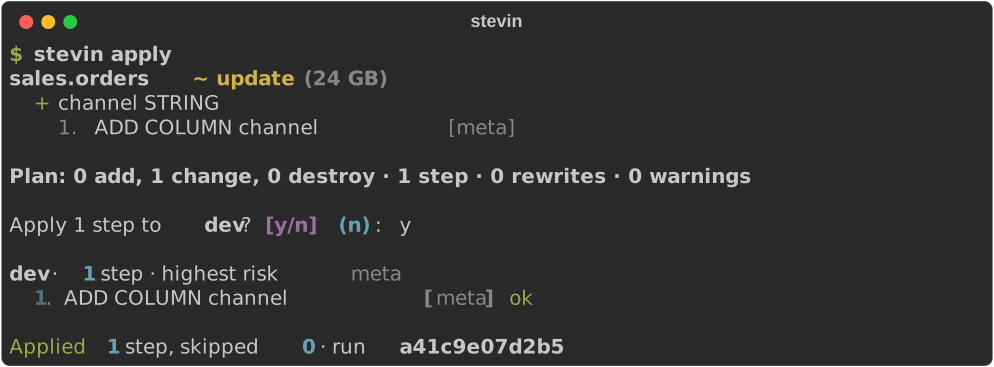
--yes skips the question; without it, a closed stdin (a CI job) counts as no. A plan
that destroys something is refused before the question, unless you pass
--allow-destructive.
Planning this way takes --select and nothing else of plan's: there is no --clone
and no --check-order here. For a plan made with either, save it —
stevin plan --clone -o plan.json — and apply the file.
With a plan file, apply runs exactly that plan — what CI does after a plan was
reviewed on a pull request. Either way it prints each step as it resolves:
dev · 6 steps · highest risk destructive

  1. enable typeWidening          [feature]  ok
  2. ALTER COLUMN TYPE            [meta]     ok
  3. ADD COLUMN address.zip       [meta]     skipped (already applied)
  4. enable columnMapping         [feature]  ok
  5. RENAME COLUMN                [meta]     ok
  6. DROP COLUMN                  [destructive] ok

Applied 5 steps, skipped 1 · run 3f9a2b1c4d5e
A step that takes a while — a rewrite of a big table — shows how long it has been running, updated every half minute in a terminal and once every five minutes in a log:
There is no time limit on a step: it takes as long as it takes. Ctrl-C asks the
warehouse to cancel the statement that is running, releases the lock, and leaves the run
resumable — the next apply of the same plan continues from that step. apply then
says what became of the statement. It can only be cancelled once the warehouse has
answered with its id: interrupted before that, or when the warehouse refuses the cancel,
apply says the statement may still be running, and the workspace's Query History is
where to find it.
Four promises, and no others — DDL is not transactional across statements, so there is no rollback:
- Nothing runs from a stale plan. Before a fresh run,
applyre-reads every table the plan was built from and recomputes the state fingerprint. If anything moved, it refuses and tells you to plan again. (Which is also why applying the same file twice is refused: the second time, it is stale.) It reads them holding the lock, so anotherapplycan't move a table between the check and the first step. - Steps don't repeat themselves. Before each step, stevin asks whether the change it implements is already true of the live table, and skips it if so.
- A failed run resumes. Every step's outcome is written to the history table, so
running
stevin apply plan.jsonagain picks up from the step that failed instead of starting over. The fingerprint is not re-checked on a resume — of course the tables changed, the first half of the plan changed them. - One run at a time. A lock row per target, taken with a conditional update and confirmed by reading it back. It has a one-hour TTL so a run that died can't hold it forever, and a live run renews it before every step — so a rewrite that takes longer than an hour keeps it. If a run ever finds it has lost the lock, it stops before the next step rather than carry on beside whoever took it.
--select (on plan and apply) narrows the work to some specs: a name as short as
orders or as full as dev.sales.orders, or a pattern like sales.*; repeat it for
more. A selection plans only what it names — tables outside it are never reported as
orphans, and never dropped, even in a strict schema.
Exit codes
A program that runs apply reads the exit code, and need not read the words:
| Exit code | Meaning |
|---|---|
0 |
Every step ran or was already done. Also: there was nothing to do. |
1 |
A failure: a step failed, the target is locked, the workspace or the plan file could not be read, or the answer to the question was no. Fix the cause and run it again. |
3 |
Refused, and this plan will never run. It is stale, its file is not a plan this version of stevin reads, or it holds a step stevin could not write. No statement ran. Plan again. |
4 |
Refused: the plan destroys something and --allow-destructive was not given. No statement ran. The same plan runs with the flag. |
5 |
Without a plan file only: no plan could be made yet, because it needs what another tool has yet to make. No statement ran. As for plan. |
130 |
Stopped with Ctrl-C. |
2 is not one of them: it is what the command line itself answers to an option it does
not know. show and ui exit 3 too for a file that is not a plan
this version reads.
--allow-destructive is required for any step in the destructive class; without it
apply refuses before running anything at all. A plan containing a step stevin
couldn't generate — a conversion it won't invent, a change a generated column
blocks — is refused the same way, naming the step and what it needs. A restore point —
the table's Delta version before the step — is recorded for every destructive step and
every rewrite when it can be taken, and shown on the step's line, so RESTORE TABLE … TO
VERSION AS OF n is one command. When the version can't be read the step still runs — it
was reviewed and allowed — and its line says no restore point, with the reason.
History
apply keeps three Delta tables in the schema named by history_schema in
stevin.yml, and creates the schema and the tables on first use:
| Table | One row per |
|---|---|
runs |
apply — with its plan hash, target, user, tool version and status |
steps |
step — with the SQL, the outcome, any error, and the Delta version before it |
lock |
target — held while a run is in flight |
drift
Asks whether apply would do anything, and exits accordingly:
| Exit code | Meaning |
|---|---|
0 |
Live tables match their specs. |
2 |
They have drifted — the plan is printed. |
1 |
Something went wrong. |
5 |
It cannot say yet: the plan needs what another tool has yet to make. As for plan. |
Drift is a hand edit in the catalog, a table dropped outside stevin, a spec merged but
never applied. Unmanaged objects are not drift: stevin never claimed them. Neither is
an ABAC policy a table is under: each is
listed under its table as not stevin's, left untouched, the way a grant no spec names
is, and the exit code stays 0. Point a
scheduled workflow at it.
When the hand edit was the right call, adopt writes it into the spec instead
of planning it away.
list
Lists the objects the specs describe for a target, and whether each is there. It reads, and changes nothing.

One line per spec: the name, what kind of object it is, and whether an object of that
kind exists under that name. Nothing is compared with its spec, so a table that has
drifted exists; plan and drift say what differs. A table no
spec describes is not listed.
It is the cheap question. Each schema the specs name is read once, no table's
definition is read in full, and no policy is asked for. --select narrows it as it
does for plan.
--json gives the same as data, for a program:
{
  "target": "prod",
  "objects": [
    {"name": "prod.sales.orders", "kind": "table", "exists": true},
    {"name": "prod.sales.big_orders", "kind": "view", "exists": false}
  ]
}
| Key | What it is |
|---|---|
target |
The target the specs were read for. |
objects |
One entry per spec, in the order the specs were found. |
name |
The full name: catalog.schema.name, or catalog.schema for a schema. |
kind |
table, view, function, schema or volume. |
exists |
Whether an object of that kind is there under that name. |
It exits 0 when the workspace could be read, whatever is missing, and 1 when it
could not: a spec that does not read, a selection that matches no spec, no connection.
access
Says who may see one table, and through what. It reads, and changes nothing.
prod.sales.orders   access
  owner sales-platform

  Granted
    analysts
      SELECT          inherited from schema prod.sales
    etl
      MODIFY, SELECT  the table's own

  What narrows a read
    · row filter prod.security.by_region on region
    · mask on customer_email with prod.security.mask_email
    · policy mask_pii (column mask, on schema prod.sales) masks columns matching
      has_tag('pii') AS c with prod.security.redact, for account users except
      pii_readers

  This lists what is granted and what is in scope. It does not:
    · evaluate a policy's condition for a given reader
    · resolve who is in a group
    · run a query as someone else
    · list USE CATALOG and USE SCHEMA, which a reader needs as well
- Granted: each principal with a privilege on the table, and where it is granted — the table's own, or inherited from the schema or the catalog.
- What narrows a read: the table's row filter, its column masks, and the ABAC policies in scope.
- The owner.
The name is catalog.schema.table. In a project it may use a target's variable, as a
spec does; outside one, write it out. It works without a stevin.yml, with --profile
and --warehouse-id.
Where the workspace refuses to list policies, the report says so once and is otherwise
complete. Grants and policies are read whatever manage:
says: the report only reads, and what another tool put on the table is part of the
answer.
The last four lines are part of the report on purpose. It lists; it does not decide
what one reader sees. --json gives the same as data, with those four under does_not.
It exits 0 when the table could be read, and 1 when it could not: no such table, a
view, no connection.
Who may see a table →
force-unlock
apply takes a lock so two runs can't fight over the same tables. If a run dies hard
without releasing it, this does — and tells you which run was holding it. The lock also
expires by itself after an hour.