Caland
Databricks secrets, by hand: a keyboard-driven page in your browser, served from your own machine. Browse scopes, secrets and grants; create, edit, move and delete; show and copy values; put a certificate in from a file.
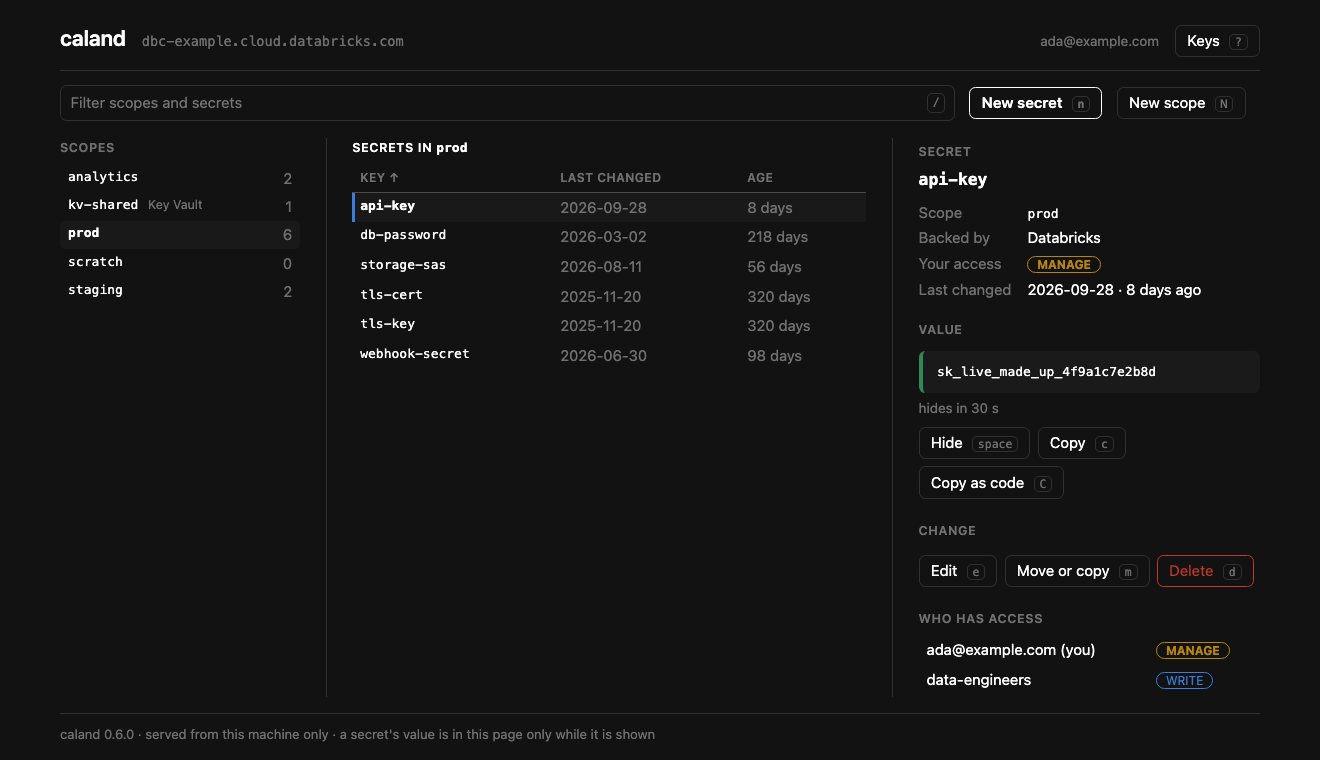
Databricks secrets have an API and a CLI, and no screen. Rotating a key is a command copied from a wiki, and who may read which scope is a question nobody can answer quickly. Caland is the screen: everything about a workspace's secrets at once, a keystroke away, with a value read only when you ask for it and written nowhere.
Highlights
- Three panes — the scopes, the ones out of reach greyed, the secrets of one with when each was last changed, and the detail: your access, who else has a grant, and the value once you ask.
- Everything has a key, and everything can be clicked. Tab goes from pane to pane.
- Secrets, with a way back — create, edit, move, copy, rename and delete; nothing is deleted without a Y, and U puts the last one back.
- Files as they are — choose a certificate with your system's own file dialog. Caland says who it is for and when it expires before it is saved, and stores it byte for byte.
- Grants — who has access to a scope, given, changed and removed; what you can reach; what somebody else can.
.envin and out, and a report of the secrets nobody has changed in a while.- A value is shown when asked, and hides itself after 30 seconds. It is read from the workspace each time you ask, and written nowhere: no cookie, no file.
- Yours only — the page is served from
127.0.0.1to you, and answers to nothing else. - Read-only when you want it —
caland prod --read-onlychanges nothing in the workspace. - Nothing to set up — it finds the workspace of a bundle in the current folder and the
profiles in
~/.databrickscfg, or signs in to an address through the browser.
Quick start
Caland starts, opens a tab, and — when there is more than one workspace it could mean — asks which. Ctrl+C in the terminal stops it and forgets every value it held.
Next steps
- Installation — install with uvx, uv tool, or pipx.
- Connecting — which workspace, and how it is found.
- Using the page — what it does, its keys, and how it is kept yours.
- Security — what it keeps to, and what it holds of a value.
- Tried, and not yet — what has run against a real workspace.
Where it fits
Caland is one of the Kostavo tools: small tools for the ugly gaps on Databricks, one gap each. Its gap is the secret you reach through an API. Each works alone. Why the tools exist has the rules they keep, and the README says when not to use it and when you no longer need it.
Caland is named after Pieter Caland (1826–1902), the engineer who designed and built the Nieuwe Waterweg, the cut through the dunes that gave Rotterdam its way to the sea.
Community project, not affiliated with or endorsed by Databricks.