Using the page
Caland is a page in your browser, served from your own machine.
caland            # the workspace there is no doubt about, or the page asks which
caland prod       # a profile from ~/.databrickscfg, or a bundle's target, by name
caland --no-open  # print the link instead of opening a browser
It starts a small server on this machine, opens a tab, and says so:
Ctrl+C stops it and forgets every value it held. So does leaving it alone for 30 minutes. If you close the tab, press Enter in the terminal for a new one. Reloading the tab is fine; coming back to it from another site is not — the page asks for a new link then.
If no tab opens, or the link opens in something that is not your browser, start it with
--no-open and open the link it prints. The link works once.
If the page says caland failed, something went wrong inside Caland itself, and the terminal has a line about it:
Which request, what kind of failure, and where in the code — never a value, and nothing else of what was asked. That line is what a bug report needs.
What it does
Three panes: the scopes you can reach, the secrets of the selected scope with when each was last changed, and the detail — your access, who else has a grant, and the value once you ask for it. The page is there at once and fills as the workspace is read; filtering happens in the page, over names it already has.
Secrets. N makes one, E edits the selected one: type a value, or choose a file. M moves, renames or — with keep the original — copies it, to any scope you can reach. D deletes it after a deliberate Y, and U puts the last one back, for as long as Caland runs.
Files. Choose a file opens your system's own file dialog, and a file can be dropped on
the form. Before anything is saved the form says what you picked: its size and kind, and for
a certificate who it is for, who issued it and when it expires. A file is stored byte for
byte — a .p12 or a .der goes in and comes out the same — and a value that is no text is
shown as what it is: so many bytes, as base64.
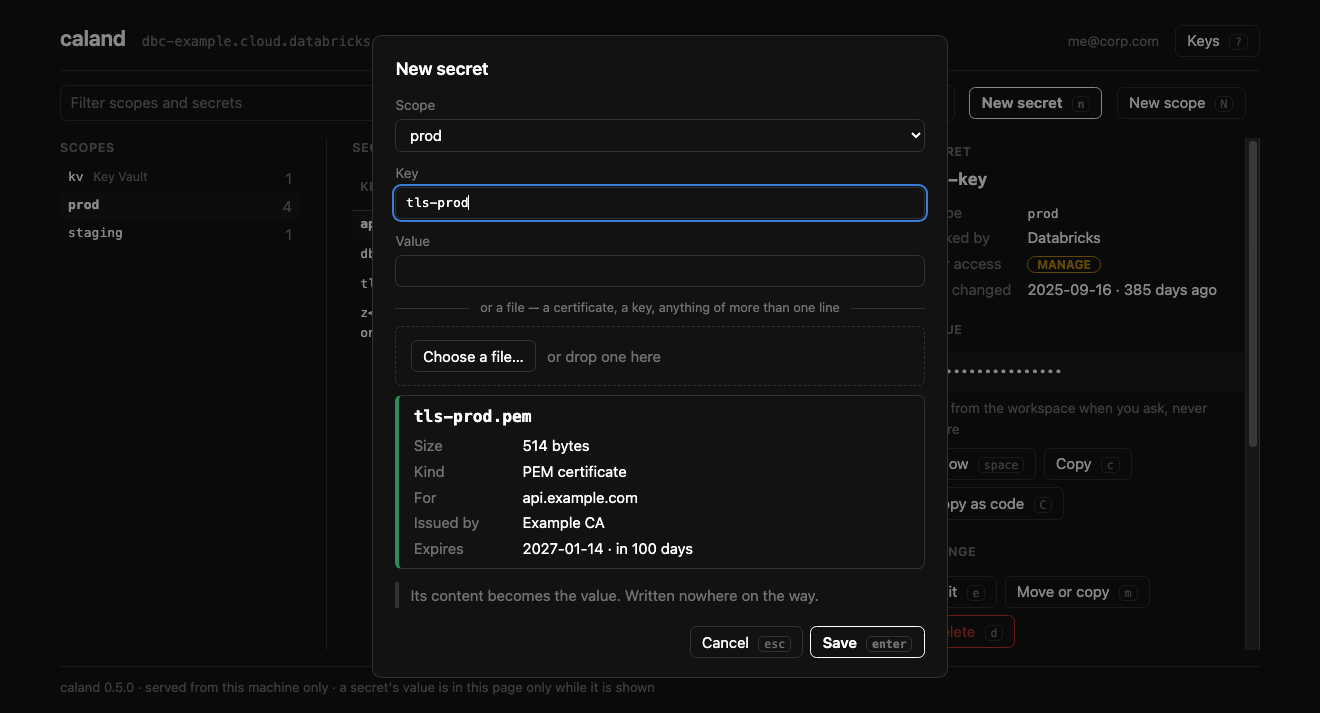
A certificate pasted into the value field is taken line for line, like a file — a field holds one line, and would join the rest to it.
Grants and scopes. P lists who has access to the scope, and gives, changes and removes a grant; removing asks first, and says so when the grant is your own. In that list Up Down pick a grant, E changes it and D removes it. Shift+N makes a scope; Shift+D deletes one, after saying how many secrets go with it. A scope has a key of its own so that a D meant for a secret never reaches one.
Nothing lands on what is there. A new secret does not overwrite an existing one, a move
does not land on another secret, and U does not put a secret back over one made since.
Databricks does not tell names apart by their case — API-KEY is api-key — and neither
does Caland: a rename that only changes the case is refused, because it would write the
secret and then remove it.
.env in and out. I fills the scope from a .env file: before anything is written
it says how many secrets go in and which of those that exist are overwritten. If the
workspace refuses one halfway, the import stops and says at which key; what went in before
it stays. X copies the scope as .env — the keys only, as a template, or with every
value after a Y. Either way it goes to the clipboard and nowhere else.
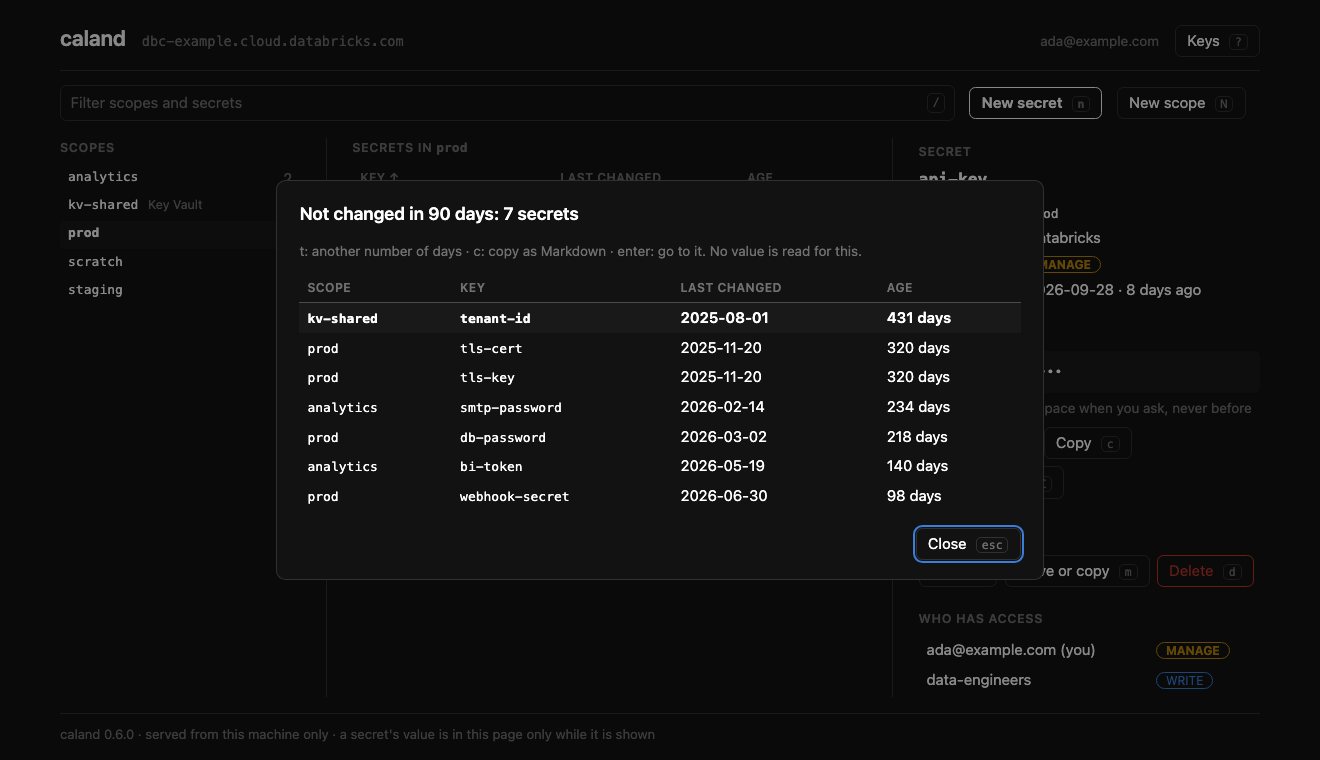
What has gone stale, and who can reach what. Shift+A lists the secrets nobody has changed in 90 days, oldest first; T moves that to 30, 180 or 365 days and it is kept, C copies the table as Markdown for a ticket, Enter goes to the secret. A lists every scope with your access and how many have a grant on it. Shift+P lists every grant made to a name — type a user, a group or a service principal — for an access review, or for someone who has left. None of the three reads a value.
Sorting. S sorts the pane the keyboard is in by its next column, Shift+S the other way round; a click on a heading does the same.
Read-only. caland prod --read-only offers no change to the workspace at all — and
the server refuses one whatever the page shows. What is kept on your own machine is kept
as always: F and the stale report's number of days, and a profile if you sign in to an
address and ask to keep it.
A Key Vault-backed scope's secrets are Azure's: they can be shown, copied, and copied out to another scope, and nothing else.
Keys
Everything has a key, and everything can be clicked.
| Keys | Action |
|---|---|
| Tab / Shift+Tab | The next pane, and back: scopes, secrets, detail |
| Left Right / H L | Also from pane to pane; in the detail, along its buttons |
| Up Down / J K | Up and down inside a pane |
| G / Shift+G | To a pane's first and last |
| / | Filter scopes and secrets: Down picks while you type, Enter goes to what is left, Esc clears |
| Space | Show or hide the value; it hides itself after 30 s |
| Enter | In the scopes: on to the secrets. On a secret: show or hide the value |
| C / Shift+C | Copy the value / copy how to reach it from code |
| N / Shift+N | New secret / new scope |
| E · M · D | Edit · move, copy or rename · delete the secret |
| Shift+D | Delete the scope |
| U | Put back the secret last deleted or moved away |
| P | Who has access to the scope; there Up Down pick a grant, E changes it, D removes it |
| I / X | Fill the scope from a .env file / copy the scope as .env |
| Shift+A · A · Shift+P | Secrets gone stale · what you can reach · what somebody else can |
| S / Shift+S | Sort the pane by its next column / the other way round |
| F | Only the scopes you can reach, or all of them (kept) |
| W | Another workspace |
| R / Shift+R | Read the scope again / the whole workspace |
| ? | The keys |
| ? then Z | Forget every value Caland holds, and with them what U could put back |
Tab moves between panes, not between buttons, and blue marks where the keyboard is: a bar on a row, a ring on a button. After the last pane Tab goes on to the browser's own bar, as on any page.
How it is kept yours
A server that can read secrets, next to a browser full of other sites, has to be sure who is asking.
- This machine only. It listens on
127.0.0.1, on a port chosen at start. There is no option to listen wider. - Its own page only. A request that did not come from Caland's own page, at Caland's own address, is refused — another site in your browser cannot reach it.
- Nothing without the session's key. The page is let in once, with a one-time key, and holds a token for that tab, good until Caland stops. The token is sent in a header, never as a cookie, so no other program serving pages on your machine is ever sent it. The one-time key reaches your browser in a file only you can read, not on a command line.
- A value is in the page only while it is shown. It is asked for when you press Space, and taken out again when hidden. Copying never writes it into the page.
- A file you pick goes to Caland on your machine and from there to Databricks. It is written nowhere on the way, and nothing of it is kept once it is saved.
- Nothing changes without being asked, and nothing is deleted without a Y. Started
with
--read-only, nothing in the workspace changes at all. - The browser keeps nothing. No cache, no cookie, no history of values. The page loads nothing that is not Caland's own. What Caland itself holds in memory while it runs, and how it is forgotten, is under Security.
What it cannot defend
A browser extension that is allowed to read every page can read a value while it is shown, as anyone who can see your screen can. If that worries you for a workspace, use a browser profile without extensions.
If you want a terminal app
That is isolinear: what Caland was until 0.6, still on PyPI as it was, and a separate tool now.